The Ultimate Guide to Using Google Webmaster Tools for SEO and Ranking Your Website

Google Search Console is a vital tool for SEO that helps website owners submit sitemaps, verify site ownership, monitor search traffic, and fix issues to improve Google search rankings. Submitting sitemaps generated by CMS platforms or SEO plugins ensures Google can efficiently crawl and index site content. Verification methods include HTML meta tags and Google Analytics linkage. Ensuring Googlebot can access all site resources like CSS and JavaScript is crucial for proper page rendering and ranking. Creating unique, well-structured content enhances user experience and SEO effectiveness. Continuous monitoring and optimization using Search Console and Analytics data allow adaptation to algorithm updates and user behavior changes, fostering better website visibility and performance in Google Search.
Understanding Google Webmaster Tools for SEO
Google Webmaster Tools, now known as Google Search Console, serves as an essential platform for monitoring, maintaining, and troubleshooting your website’s presence in Google Search results. Digital marketers, small business owners, and content creators often ask how to leverage this tool for better visibility and higher rankings. Google Webmaster Tools provides invaluable feedback regarding your site’s indexing status, search queries, crawl errors, and backlink profiles. For those set on optimizing their SEO strategies, it’s important to understand the core functions of the Console, including how you can use it to discover which keywords bring visitors to your site and identify technical issues that could be blocking your content from ranking. Platforms like Get Real Google, ChatGPT Traffic on Autopilot | GetMyWebRank make it even more streamlined, offering automated ways to generate and optimize content that appears in both organic Google results and AI-powered answers from tools like ChatGPT.
Setting Up Google Webmaster Tools Step by Step
To maximize the benefits of Google’s Search Console, you need to set it up correctly from the beginning. Start by adding your website as a new property and verifying ownership using methods such as HTML file upload, meta tag, or DNS record. After verification, submitting a sitemap is crucial for guiding Google’s crawlers through your website’s structure. This step helps ensure that your pages are indexed efficiently and appear in search results as soon as possible. Additionally, setting your preferred domain and configuring important settings like geotargeting allow you to signal to Google where your audience is located and what version of your website should be indexed. Proper setup at this foundational stage leads to more accurate reporting and better insights, setting the tone for future optimization.
Key Features of Google Webmaster Tools for Ranking
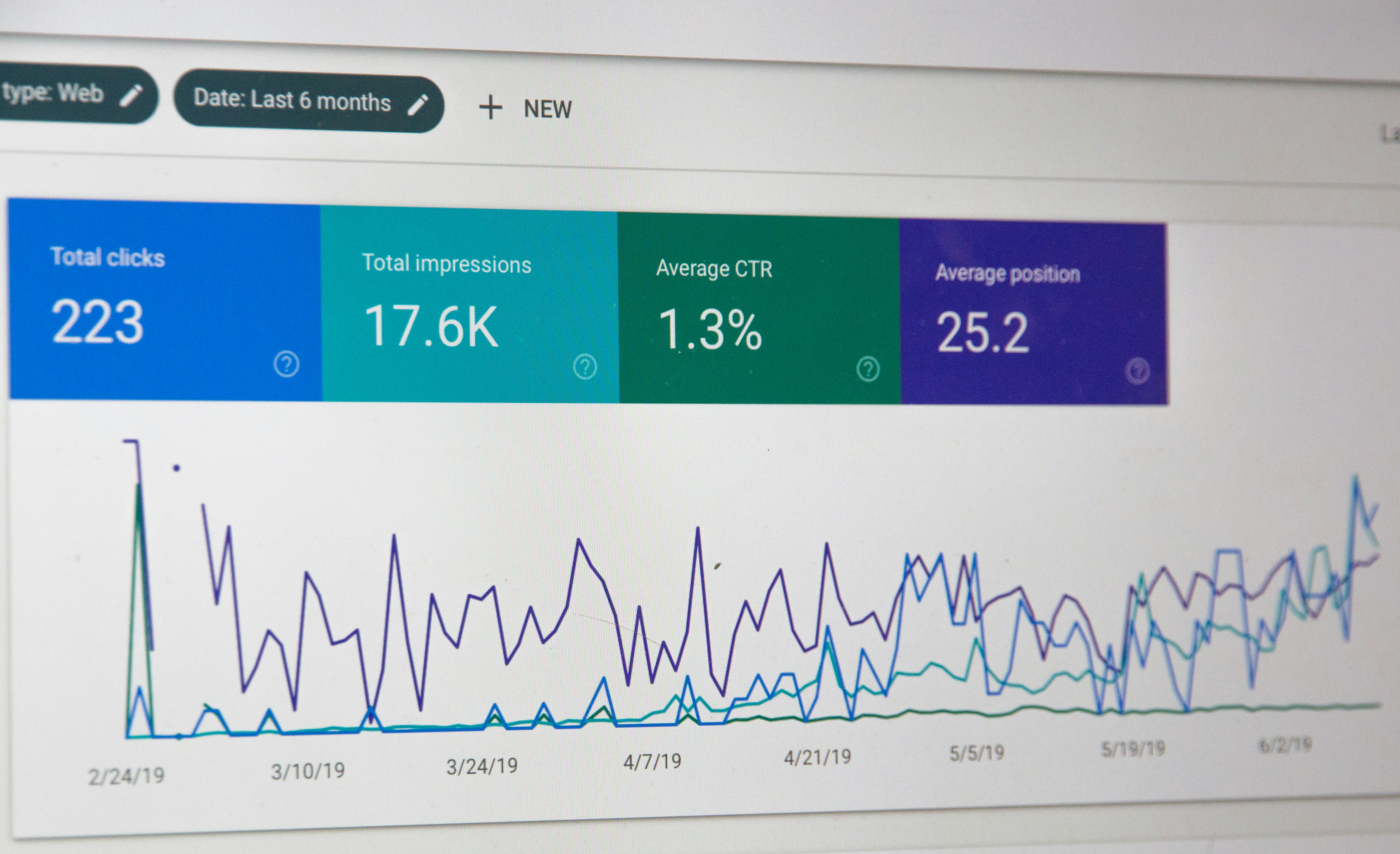
A deep dive into Search Console’s features reveals several tools that directly impact your website’s SEO performance. The Performance report shows details on impressions, clicks, average position, and click-through rates for all your pages and target keywords. Coverage reports help you identify indexing issues such as crawl errors or blocked resources, allowing you to diagnose and remedy problems before they affect your visibility. Links reports show which domains and pages are linking to your site, arming you with data to refine your backlink strategies. URL inspection lets you view technical information about individual URLs, including index status and crawling details. Each feature provides actionable insights and equips you with the information needed to troubleshoot issues and consistently improve rankings.
How to Use Google Webmaster Tools for SEO Analysis
Google Search Console empowers website owners with a robust suite of analytics to inform their SEO strategies. One of the most effective ways to analyze your SEO performance is by tracking search queries that bring traffic to your site. These insights can reveal new keyword opportunities and highlight content gaps or underperforming pages. The Console also exposes technical SEO issues, such as mobile usability errors or structured data problems, allowing you to address factors directly affecting rankings. By consistently reviewing coverage and enhancement reports, you stay informed about the health of your site and can make data-driven decisions to improve your on-page and technical SEO practices. For those aiming to further automate content generation and optimization, solutions like GetMyWebRank found at https://getmywebrank.com can complement your efforts by producing high-quality, search-friendly articles at scale.
Best SEO Practices Using Google Webmaster Tools
A well-planned SEO strategy often begins with leveraging the actionable insights Google Search Console provides. Start by routinely submitting updated sitemaps, ensuring that new and existing content is indexed quickly. Prioritize fixing any errors or warnings reported in coverage and enhancement sections, such as fixing broken links, removing duplicate content, and resolving schema markup issues. Use the Performance tab to identify queries with high impressions but low click-through rates, then optimize titles and meta descriptions for these pages. Reviewing mobile usability and Core Web Vitals ensures your site meets modern standards for speed and accessibility, both crucial ranking factors. These practices, combined with regular audits and keyword research, form a reliable foundation for sustained search visibility.

Submitting Your Sitemap and Indexing New Content
Submitting a sitemap is one of the key ways to ensure Google finds and indexes all valuable pages on your website. Search Console makes this process straightforward: in the Sitemaps section, you can submit your sitemap URL and regularly monitor the status by reviewing index coverage and submission history. Keeping your sitemap updated as you add, remove, or modify content helps maintain accurate indexing and speedy reflection of your changes in search results. For newly published pages, the URL Inspection tool allows you to request manual indexing, further decreasing the time between publication and discoverability. This proactive approach, when integrated with automated content generation workflows, expedites the time it takes for your material to reach your audience in both classic search and AI-driven platforms.
Technical SEO Tips Using Google Webmaster Tools
A core benefit of Google Webmaster Tools is its capacity for uncovering and resolving technical SEO issues. Start by regularly auditing crawl errors and ensuring that key resources like JavaScript, CSS, and images are accessible to bots. Monitoring the Mobile Usability report highlights issues that can impede performance on smartphones and tablets, critical in an era where the majority of searches are mobile-based. Enhancements like Core Web Vitals provide vital information about page loading speed and interactivity, metrics which have become significant ranking signals. By patching technical faults promptly, optimizing site structure, and validating structured data, you enhance your website’s overall search friendliness and user experience.
Monitoring and Tracking SEO Performance
Once your site is set up and optimized, monitoring ongoing performance ensures you maintain or improve your ranking position. Google Search Console’s dashboard provides daily updates on impressions, clicks, ranking trends, and user engagement statistics. Setting alerts for critical issues allows you to react swiftly to sudden drops in traffic or new errors detected in your site’s code or configuration. Comparing historical data lets you measure the impact of changes and spot new opportunities based on seasonal trends or emerging keywords. For marketers managing multiple sites or content creators scaling up operations, integrating Search Console data into reporting dashboards or automated solutions brings additional efficiency to their daily routines.
Advanced SEO Techniques for Better Google Rankings
To rise above competitors, consider advanced tactics that leverage insights from Search Console as well as AI-driven solutions. Analyze keyword gaps by comparing your top ranking queries to those driving traffic to industry leaders, then create content to close those gaps. Use link reports to identify high-authority referrers and build relationships for further quality backlinks. Employ structured data to enhance SERP appearance with rich results, and monitor enhancements for continual improvement. Experiment with A/B testing page titles or content structures, applying what works site-wide. Automation platforms enable you to publish and test large volumes of SEO content efficiently, facilitating faster learning cycles and broader reach in search and AI-powered recommendations.
FAQs
1. What is the difference between Google Webmaster Tools and Google Search Console?
Google Webmaster Tools was the original name for what is now called Google Search Console. The core functionality remains focused on monitoring, maintaining, and improving a website’s performance in Google Search, but the newer interface includes more features and enhanced usability for webmasters and SEOs.
2. How often should I submit my sitemap to Google Search Console?
You should submit your sitemap each time you make significant updates such as launching new pages, updating site structure, or removing outdated content. However, for most sites, a single submission suffices since Search Console will re-crawl your sitemap automatically.
3. Can Google Webmaster Tools help with keyword research?
Yes, Search Console provides data on the queries users search to find your site. This information helps identify high-performing keywords to focus on and discover new opportunities for content expansion.
4. What technical SEO issues does Search Console detect?
Google Search Console detects indexing errors, crawl anomalies, mobile usability issues, Core Web Vitals performance, structured data errors, and manual penalties among other technical SEO challenges.
5. How quickly can SEO improvements appear in Google rankings?
The time it takes for SEO changes to reflect in search rankings varies widely based on the type of change, competition, and crawl frequency, but you may see initial results anywhere from a few days to several weeks after implementing optimizations.
People also ask
How do I submit a sitemap to Google Search Console?
Locate your sitemap URL (often generated automatically by your CMS or SEO plugin), then log into Google Search Console, select your property, navigate to the Sitemaps section, enter the sitemap URL, and submit it for indexing.
What are the ways to verify site ownership in Google Search Console?
You can verify ownership by adding an HTML meta tag to your homepage, linking your Google Analytics account (using the same Gmail), uploading an HTML file, or using DNS record verification.
Why is it important that Googlebot can access CSS and JavaScript on my site?
Googlebot needs to see the page as users do to properly understand and rank your content. Blocking CSS or JavaScript can prevent Google from rendering your pages correctly, harming your search rankings.
How can Google Search Console help improve my website's SEO?
It provides insights into search traffic, indexing status, crawl errors, performance metrics, and alerts about issues, enabling you to optimize your site and improve ranking.
What content practices improve SEO according to Google?
Create unique, high-quality, user-focused content that is well-structured using headings, lists, and short paragraphs to enhance readability and relevance.
About GetMyWebRank
We help founders and agencies create and publish SEO content in minutes, not days. Our system learns your brand tone and publishes human-grade articles directly to your site to speed up indexing and discovery.