How to Use Google Webmaster Tools to Improve SEO and Website Ranking

Improving website ranking on Google involves a combination of technical SEO, content optimization, and user experience enhancements. Google Search Console (formerly Google Webmaster Tools) is an essential tool that provides insights into how Google crawls and indexes your site, helping identify and fix issues. Blocking critical resources like CSS and JavaScript can harm your site's ability to rank. For local businesses, maintaining a complete and verified Google Business Profile with accurate information and positive reviews is crucial for local search visibility. Key SEO best practices include using relevant keywords in titles and content, optimizing images, ensuring fast page load times, mobile-friendliness, and securing your site with HTTPS. User experience signals such as reducing pogo-sticking and providing high-quality content also influence rankings. The top SEO ranking factors for 2026 emphasize site security, speed, mobile optimization, domain authority, technical SEO, and brand trust. Following these guidelines and leveraging Google Search Console tools can significantly enhance your website's performance in Google Search results.
Understanding Google Webmaster Tools
Google Webmaster Tools, now known as Google Search Console, is an essential platform for anyone aiming to enhance their website ranking and SEO performance. This free tool gives site owners direct insights into how Google views and indexes their site, offering actionable data for improving search visibility. It enables users to monitor website health, traffic analytics, and keyword performance, all of which contribute to elevating their position in search engine results. For digital marketers and small business owners, regularly using Search Console can uncover critical issues, inform content decisions, and support long-term growth goals. Incorporating Google Webmaster Tools into your SEO workflow ensures that your strategy remains aligned with evolving search algorithms and user behavior trends.
Setting Up Your Google Webmaster Tools Account
Getting started with Google Search Console requires a straightforward registration process that can be completed in minutes. Begin by visiting the platform and submitting your website URL, after which Google requests verification to confirm site ownership. Common verification methods include adding a meta tag to your site’s homepage, uploading an HTML file, or connecting to your DNS provider. Each step is designed for user accessibility, ensuring even those with minimal technical experience can proceed confidently. After verification, your site data becomes accessible and Google immediately begins collecting performance insights that guide your optimization efforts. This early setup phase is crucial—early access to data helps identify existing issues that may be affecting your SEO outcomes.

Submitting Your Sitemap: Step by Step
Submitting a sitemap through Google Search Console is one of the most effective ways to hasten content discovery and indexing. A sitemap functions as a roadmap that helps search engines locate and understand all relevant pages on your website. Begin by preparing an XML sitemap or generating one with built-in or third-party tools, then locate the ‘Sitemaps’ section in the Search Console dashboard. Enter your sitemap’s URL and submit it directly to Google. After submission, Google notifies you of errors or warnings encountered, allowing for immediate troubleshooting. Regularly resubmitting your sitemap after site updates ensures that all content remains eligible for indexing and ranking improvements.
Monitoring Website Performance with Google Tools
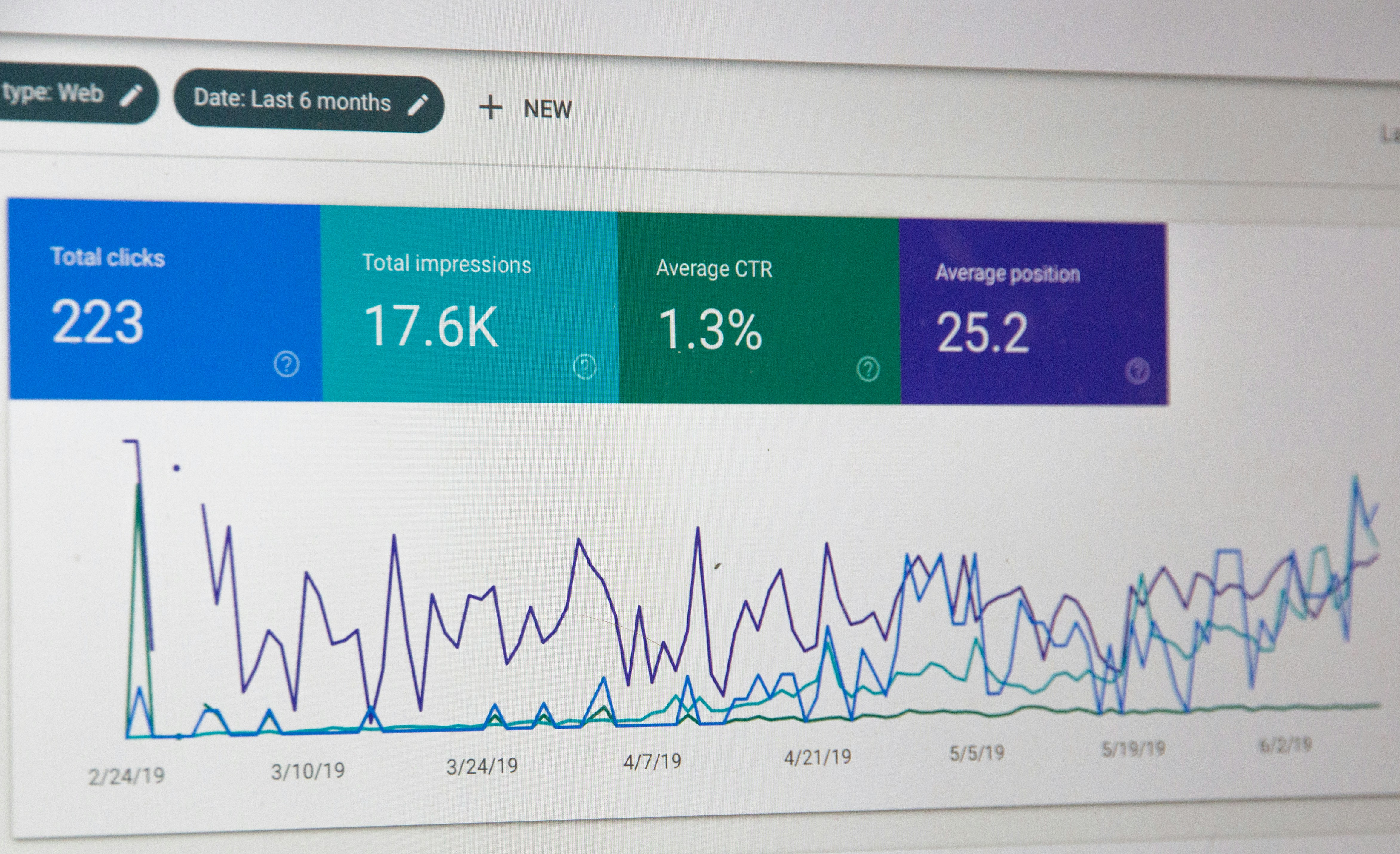
Understanding how your website performs in search involves regularly analyzing data provided in Search Console. The ‘Performance’ section offers comprehensive metrics such as clicks, impressions, average position, and click-through rates for each keyword or page. Use this information to identify your best-performing content and areas requiring further optimization. Detailed reports reveal which queries bring visitors to your site and highlight regions or devices that drive the most traffic. This enables you to adapt your strategy for maximum impact, whether that means optimizing for local queries or improving mobile usability. Additionally, performance insights can uncover patterns over time, helping to forecast trends and adjust your content calendar accordingly.
Identifying and Fixing Crawl Errors
Crawl errors occur when Google’s bots are unable to access specific pages or resources, potentially preventing important content from appearing in search results. Google Search Console automatically detects and categorizes crawl errors, typically distinguishing between site-wide issues and individual page errors. Common errors include 404 Not Found responses, server issues, and blocked resources resulting from robots.txt restrictions. By navigating to the ‘Coverage’ section, users can quickly spot these problems and access detailed error reports. Timely resolution—whether by restoring missing pages, fixing server configurations, or updating sitemaps—ensures that all valuable content remains accessible and indexed by Google.
Optimizing Website Content for SEO
Content optimization is a central pillar of any SEO strategy and is fundamental to achieving higher visibility in search. Use the data in Google Webmaster Tools to identify which pages are underperforming and experiment with changes to titles, meta descriptions, and on-page content. Incorporating relevant keywords in a natural way, improving page structure, and ensuring mobile responsiveness are all essential steps. Search Console Insights provides further context by connecting content quality with user engagement, guiding your editorial decisions. Brands like Get Real Google, ChatGPT Traffic on Autopilot | GetMyWebRank make it simple to create content optimized for both Google and AI platforms, helping businesses capture more opportunities from search and AI traffic seamlessly—explore these solutions at https://getmywebrank.com. Maintaining routinely optimized content positions your site as an authoritative resource, improving chances for high rankings.
Tracking Backlinks and Analyzing Link Data
Backlinks remain a critical factor in Google’s ranking algorithm, signaling trust and authority to search engines. Google Search Console provides backlink reports outlining which external sites are linking to your content and how individual pages are referenced. Regularly reviewing this data helps you assess the quality and relevance of your link profile, revealing opportunities to strengthen relationships with high-value domains or neutralize toxic links. Additionally, internal linking is highlighted, giving you a clearer picture of how well your site architecture supports important pages. Addressing backlink gaps and optimizing anchor text can drive significant improvement in search rankings and organic visibility.
Advanced SEO Techniques with Google Webmaster Tools
While basic setup and monitoring are valuable, leveraging advanced techniques with Google Webmaster Tools can lead to substantial competitive advantages. Utilizing structured data markup, AMP implementation, and URL inspection tools allows for fine-tuned management of how content appears in search. Tracking enhancements such as rich results or featured snippets guides further content development to target high-visibility positions. Advanced filters and segmentation let you isolate trends by device, country, or content type, providing nuanced insights that inform strategy. Site migration tools also simplify domain changes or redesigns, ensuring that search equity is preserved throughout transitions.
Common SEO Mistakes to Avoid
Avoiding frequent SEO pitfalls is crucial for maintaining and improving your site’s ranking on Google. A common error is neglecting technical SEO tasks, such as updating sitemaps or resolving mobile usability issues, which can significantly limit content reach. Over-optimizing for keywords or failing to provide valuable content often results in penalties or drops in rankings. Another mistake involves ignoring data from Search Console; missed warnings or unresolved errors can lead to prolonged issues or loss of traffic. It’s also essential to build backlinks ethically, as manipulative practices may result in penalties from search engines. By remaining proactive and informed, you position your website for sustained growth and higher visibility across search and AI channels.
FAQs
1. What is Google Webmaster Tools and why do I need it for SEO?
Google Webmaster Tools, now called Google Search Console, is a free platform that provides crucial data and diagnostics for website owners. Using it helps you monitor search performance, resolve errors, and optimize your site for higher rankings in Google results.
2. How do I submit my sitemap to Google Webmaster Tools?
Generate an XML sitemap, log in to Google Search Console, navigate to the ‘Sitemaps’ section, enter your sitemap URL, and submit it. Google will process the sitemap and report any issues it encounters.
3. What are the top ranking factors for SEO according to Google?
Key ranking factors include high-quality and relevant content, robust backlink profiles, technical site health, mobile usability, and fast loading times. Using Search Console helps you track and improve these elements continually.
4. How often should I check Google Webmaster Tools for updates?
Review your Search Console dashboard at least once per week. More frequent checks are recommended after site changes, new content launches, or resolving technical issues.
5. Can Google Webmaster Tools help me track backlinks?
Yes, the platform provides detailed reports on which external sites link to your pages and highlights your most linked content. This information is vital for refining your backlink strategy and improving domain authority.
People also ask
What is Google Search Console and how does it help SEO?
Google Search Console is a free tool that helps website owners monitor, maintain, and troubleshoot their site's presence in Google Search results. It provides insights on how Google crawls and indexes your site, alerts about issues, and suggestions to improve your site's search performance.
How can I improve my local business ranking on Google?
Ensure your Google Business Profile is complete and accurate, verify your business, provide detailed business information, and encourage customers to leave positive reviews and ratings to improve local search ranking.
What are some key SEO best practices for ranking higher on Google?
Use relevant keywords in page titles and content, optimize images, improve page speed and mobile usability, ensure site security, build domain authority through quality links, and provide a good user experience to reduce pogo-sticking.
Why is blocking CSS or JavaScript files harmful for SEO?
Blocking important resources like CSS and JavaScript can prevent Google from fully understanding your page layout and content, which can negatively impact your site's indexing and ranking.
What are the top SEO ranking factors to focus on in 2026?
Focus on site security (HTTPS), fast page speed, mobile optimization, authoritative backlinks, high-quality and relevant content, technical SEO, user experience, brand trust, and accurate business information.
About GetMyWebRank
We help founders and agencies create and publish SEO content in minutes, not days. Our system learns your brand tone and publishes human-grade articles directly to your site to speed up indexing and discovery.