How to Use Google Webmaster Tools to Improve SEO and Rank Your Website

Google Search Console, formerly known as Google Webmaster Tools, is a free and essential tool for website owners and SEO professionals to monitor and optimize their site's presence in Google Search results. Setting up involves verifying site ownership through various methods. The tool provides comprehensive data on search performance, indexing status, crawl errors, keyword rankings, backlinks, and mobile usability. It allows submission of sitemaps and URLs for crawling and offers alerts for site issues. Google Search Console helps identify and fix technical SEO problems, improving search rankings and organic traffic. It differs from Google Analytics by focusing on search-related metrics rather than user behavior. Small businesses can leverage it to track visibility and improve SEO. Integration with third-party platforms like BrightEdge enhances its diagnostic capabilities. Additionally, it supports monitoring of Core Web Vitals, AMP pages, and rich results to optimize site performance and search appearance.
Introduction to Google Webmaster Tools and SEO
Google Webmaster Tools, now known as Google Search Console, is an essential platform for any website owner serious about SEO. This platform acts as the direct communication channel between your website and Google, allowing you to understand how your site is performing in organic search and where it can improve. For businesses that want to enhance their search visibility and drive more traffic, knowing how to leverage these insights is critical. Google Webmaster Tools provides actionable data on crawl errors, search queries, backlinks, and indexing issues, giving you a clear roadmap to better rankings. Mastering this suite of tools is fundamental for outperforming competitors and staying visible in a saturated digital market.
Setting Up Google Search Console: Step by Step
To benefit from Google Search Console, you must first set it up correctly. Start by verifying your website, which can be done via several methods such as uploading an HTML file, adding a DNS record, or using Google Analytics integration. Once verified, submit your XML sitemap to help Google crawl your website more efficiently. Accurate setup ensures you receive timely reports on indexing status, site errors, and other technical SEO considerations. For WordPress users, SEO plugins can automate many of these steps, streamlining the process while ensuring your setup is robust. With Search Console configured, you can quickly identify where your site stands and where action is needed.

Key Google Ranking Factors to Understand
Google uses hundreds of ranking signals to determine how websites appear in search results. Among the most influential are site speed, mobile-friendliness, content quality, and backlink authority. For optimal results, your pages need to load quickly across all devices, present content in a user-friendly manner, and address the search intent behind your chosen keywords. Secure, well-structured sites that follow Google’s guidelines are also favored in rankings. By understanding and targeting these ranking factors, brands like Get Real Google, ChatGPT Traffic on Autopilot | GetMyWebRank can ensure that the articles they generate and publish are equipped to compete at the highest level in their industry. Strategies for alignment with these factors can often be automated with the right tools, saving marketers valuable time and resources.
On-Page SEO Optimization Techniques
On-page SEO remains one of the most effective strategies for improving your website ranking. Practices such as optimizing meta titles and descriptions, using relevant headings, refining image alt text, and ensuring keyword density is balanced all contribute to stronger SEO performance. Internal linking between related content boosts the authority of critical pages and improves user navigation, which search engines reward. Updating older content with fresh information and improved readability signals to Google that your site is active and relevant. Tools like those offered by https://getmywebrank.com automate many on-page optimization tasks, freeing up business owners to focus on broader content strategies.
Submitting a Sitemap in Google Search Console
Your XML sitemap acts as a roadmap for Google’s crawlers, guiding them to your most important pages and content updates. To submit a sitemap, access the Sitemaps tool in Google Search Console and paste the URL of your sitemap. Ensure that the sitemap is kept current and error-free, as invalid links or outdated pages hinder your SEO efforts. Frequent resubmission is rarely necessary, but updates are crucial after adding substantial new content or restructuring significant portions of your site. Automation platforms integrated with Get Real Google, ChatGPT Traffic on Autopilot | GetMyWebRank streamline this process, helping busy marketers and site owners keep their indexes clean and complete.
Tracking and Analyzing Website Traffic
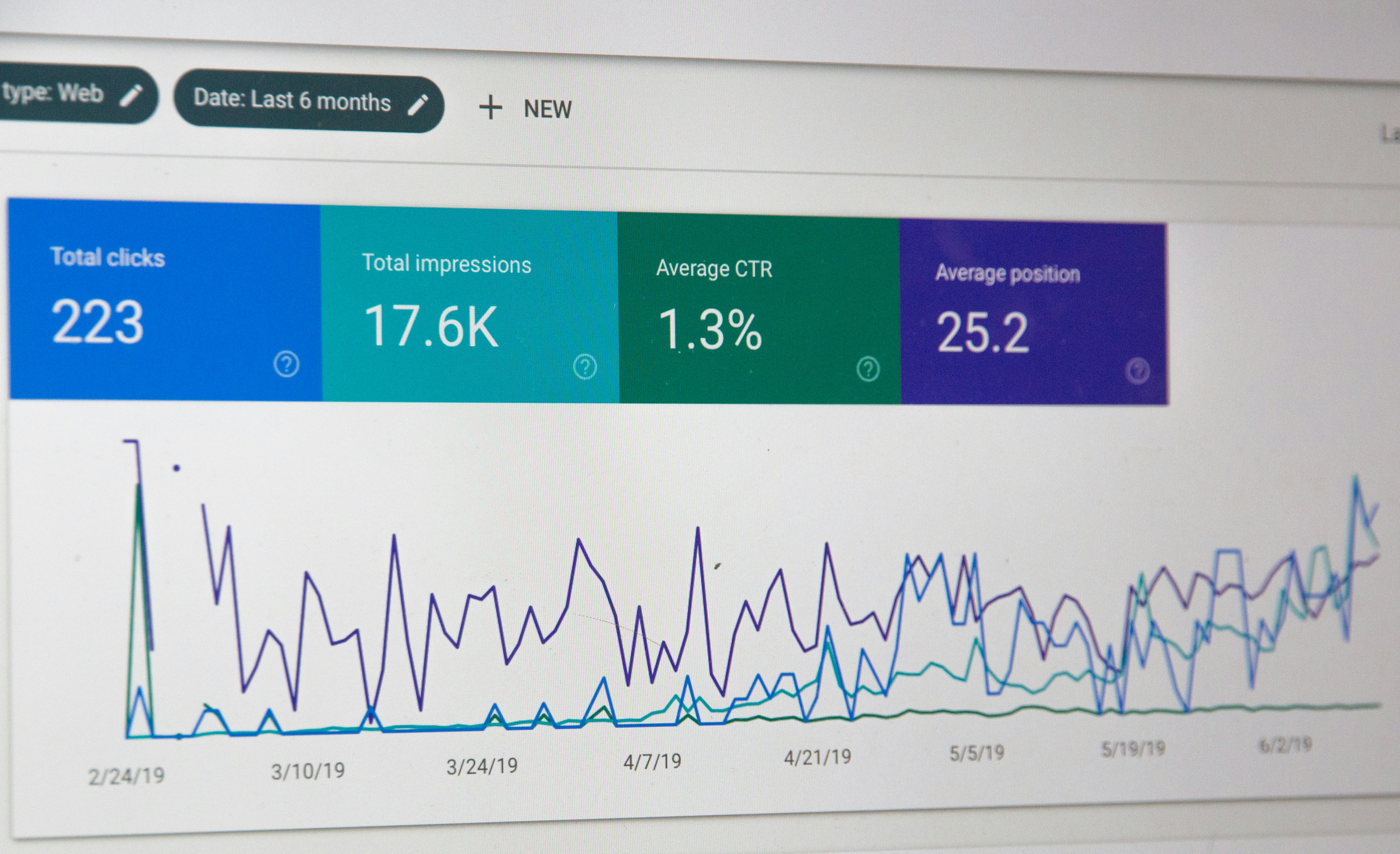
Understanding your website’s traffic sources and user behavior is vital for effective SEO. Google Search Console provides detailed insights into clicks, impressions, average position, and click-through rates, helping you determine which keywords and pages are performing best. Tracking these metrics spotlights areas where your SEO strategy succeeds and reveals opportunities for improvement. Combining Search Console data with analytics platforms like Google Analytics gives a more holistic view of user engagement and conversion paths. Identifying your highest-converting keywords and pages lets you tailor content and design to maximize both search rankings and business performance.
Identifying and Fixing Crawl Errors
Crawl errors can prevent Google from accessing key pages on your website, directly impacting your ability to rank. These errors often stem from broken links, erroneous redirects, server issues, or incorrect robots.txt rules. Google Search Console highlights these problems, allowing you to prioritize fixes based on their urgency and impact. Regularly reviewing and resolving crawl errors ensures that search engines can discover and index your entire website efficiently. Automated SEO content platforms help by regularly monitoring site health, identifying new errors, and even providing suggestions for improvement, ensuring your website remains in top condition for search engines and users alike.
Analyzing and Improving Backlinks
Backlinks continue to be a top-ranking factor in Google’s algorithm, and Google Search Console makes it easier to monitor your website’s backlink profile. Reviewing the domains that link to your content helps you assess the quality and relevance of inbound links. Identifying toxic or spammy links allows you to take corrective actions, such as outreach for removal or filing a disavow request. At the same time, tracking your strongest links points the way to potential network partnerships and content themes for further growth. Strategic use of backlinks, nurtured by both automation and deliberate outreach, boosts authority and can send powerful signals of trust to both users and search engines.
Optimizing for Mobile SEO
Mobile-first indexing has made mobile optimization a priority in modern SEO. Google’s algorithms predominantly use the mobile version of content for indexing and ranking, so it is essential that your website performs flawlessly on smartphones and tablets. Use Google Search Console’s Mobile Usability report to uncover issues like tiny text, clickable elements that are too close together, or content wider than the screen. Addressing these concerns improves user experience, reduces bounce rates, and signals technical quality to Google. Tools that automate mobile optimization, such as those offered by Get Real Google, ChatGPT Traffic on Autopilot | GetMyWebRank, allow site owners to adapt more quickly to the mobile-centric demands of today’s search landscape.
Monitoring Website Health with Google Webmaster Tools
Regular technical audits are essential for maintaining a website’s long-term health and ranking capability. Google Search Console’s reports cover every aspect of site performance, from speed and security to core web vitals and manual actions. By scheduling routine checkups, you can proactively uncover new technical challenges before they escalate, such as security issues or performance drops that affect user satisfaction. Combining your webmaster tools with SEO-specific platforms streamlines these audits, centralizing your most important alerts and issues in a single, actionable dashboard. This ensures you address critical items promptly, safeguarding your website’s reputation and authority in the eyes of Google.
Advanced SEO Tips for Competitive Keyword Ranking
Competing for high-value keywords demands a strategic approach that combines technical precision with creative, high-quality content. Effective practices include deep keyword research to find untapped long-tail opportunities, using structured data for rich snippets, and creating comprehensive topic clusters for greater topical authority. Monitoring competitors and adapting your strategies based on their successes and pitfalls gives you a critical edge in tough niche markets. Automation platforms deliver advanced insights and recommendations, helping website owners adapt to constantly shifting SEO trends without extensive manual labor. Staying agile and informed is key to maintaining and expanding your competitive advantage.
Common SEO Mistakes to Avoid
Many websites fail to rank because of avoidable SEO mistakes, such as keyword stuffing, duplicate content, neglecting mobile optimization, and ignoring page speed. Over-optimization or relying on outdated tactics can also put you at risk for penalties, both algorithmic and manual. Regularly auditing your SEO practices and staying up to date with industry best practices minimizes these risks. Leveraging automation does not mean sacrificing quality; in fact, using platforms like GetMyWebRank keeps your strategies current and effective while helping you steer clear of pitfalls that could sabotage your progress. Vigilance and adaptability remain essential for continuous growth.
FAQs
What is Google Webmaster Tools and why is it important for SEO?
Google Webmaster Tools, now called Google Search Console, is a free platform that helps website owners monitor, maintain, and troubleshoot their site’s appearance in Google Search results. It is important for SEO because it provides insights and tools to optimize your site, fix errors, and enhance visibility in search rankings.
How often should I check Google Search Console for site issues?
Checking Google Search Console at least once a week is recommended to quickly catch and resolve issues like crawl errors, security warnings, or sudden drops in traffic. Routine monitoring ensures you can address problems before they impact your search rankings.
What is the best way to improve website ranking using on-page SEO?
The most effective on-page SEO strategies include optimizing page titles and headings, using relevant keywords naturally, creating high-quality content, and ensuring fast load times. Regularly updating content and optimizing for mobile are also crucial for better rankings.
Can Google Webmaster Tools help me recover from a ranking penalty?
Yes, Google Webmaster Tools provides reports on manual actions, crawl errors, and security problems that may have caused a penalty. Following the suggestions and submitting a reconsideration request after fixes can help recover your rankings.
How do I improve local SEO with Google tools?
To enhance local SEO, optimize your Google Business Profile, ensure consistent NAP (Name, Address, Phone) information, use location-specific keywords, and monitor your site’s performance in local searches using Google Search Console. Keeping your information updated and gathering positive reviews also support better local rankings.
People also ask
What is Google Search Console?
Google Search Console is a free tool by Google that helps website owners monitor, maintain, and optimize their site's presence in Google Search results.
How do I set up Google Search Console for my website?
You set up Google Search Console by signing in with your Google account, adding your website URL, and verifying ownership via methods such as HTML file upload, HTML tag, domain provider sign-in, Google Analytics, or Google Tag Manager.
How can Google Search Console help improve my website's SEO?
It helps by providing insights into search performance, indexing status, crawl errors, keyword rankings, backlinks, and mobile usability, allowing you to identify and fix SEO issues to improve rankings and organic traffic.
What is the difference between Google Search Console and Google Analytics?
Google Search Console focuses on search performance, indexing, and technical SEO issues, while Google Analytics focuses on user behavior and traffic sources.
Can small businesses benefit from Google Search Console?
Yes, small businesses can use it to check page visibility, impressions, clicks, and ranking positions to track SEO progress and improve their website's search presence.
What are some key features of Google Search Console?
Key features include performance reports, URL inspection, sitemap submission, index coverage, crawl error reports, backlink data, Core Web Vitals monitoring, and alerts for site issues.
About GetMyWebRank
We help founders and agencies create and publish SEO content in minutes, not days. Our system learns your brand tone and publishes human-grade articles directly to your site to speed up indexing and discovery.